





Send your registration data in exactly the format your other systems expect
When a new attendee signs up, you usually want that information to flow straight into the rest of your stack — your CRM, your data warehouse, your marketing platform. The catch is that every system has its own opinion about how that data should look.
One expects a Salesforce-style "Lead" object, another wants the ticket details nested inside a "Booking" wrapper, a third needs a fixed source identifier on every record. "Can we just send it the way our CRM expects?" is usually where the conversation with the developer starts — and where the integration project quietly grows.
Structured JSON Payload is an idloom integration mode that solves this. You describe, just once, the exact shape your target system expects, mark the spots where live data should go, and idloom fills in the blanks automatically every time a registration comes in. No middleware to maintain, no developer round-trips when the receiving system changes its format. Structured JSON Payload is available to any idloom user with access to the Integrations area, on any integration that uses webhooks or the V4 API.
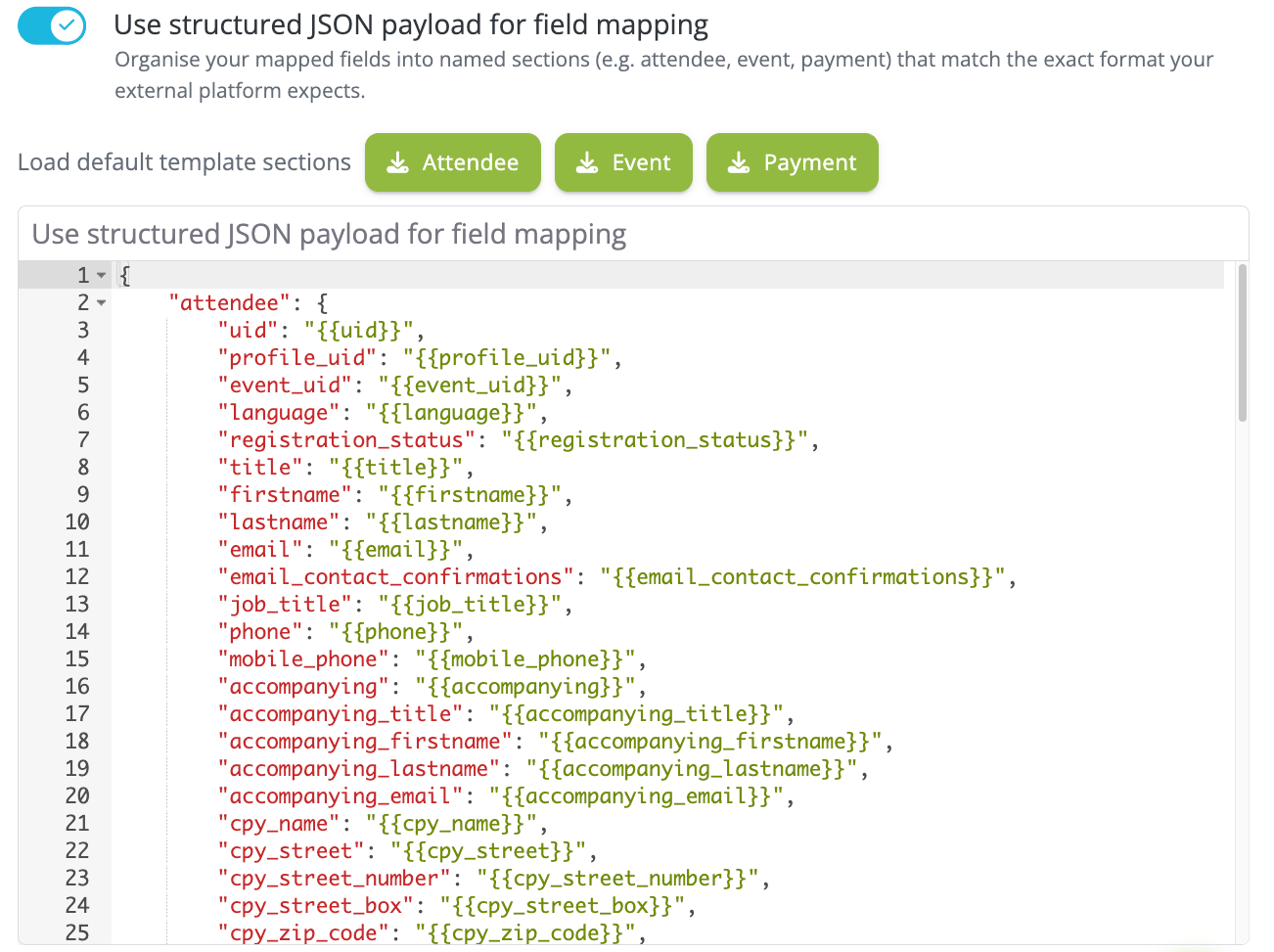
How to enable Structured JSON Payload on an integration
Structured JSON Payload is toggled per integration — not globally — so you can run it on some integrations while others stay on the classic flat Fields mapping mode.
- In your idloom workspace, go to Manager → Integration → Idloom → Edit for the integration you want to switch.
- Toggle Structured JSON payload on. The flat Fields mapping editor disappears and is replaced by a JSON editor. The toggle saves immediately.
- Click one of the Load defaults buttons above the editor — Attendee, Event, or Payment — to pre-fill a complete reference template for that object type. Trim it to what your target system needs.
- Edit the template using
{{placeholder}}syntax (see below) and save.
Your previous flat Fields mapping configuration is preserved when you switch — it is not deleted, just paused. If you toggle Structured JSON Payload back off, the flat configuration is restored automatically.
Write your JSON template
A Structured JSON Payload template is a single JSON object with up to three top-level keys — "attendee", "event", and "payment" — each defining the shape for its object type. You only need to include the sections you use; a missing section falls back to the default payload for that object type, and the webhook still fires.
Placeholder syntax
Dynamic values are injected using {{placeholder}} syntax. A few rules to keep in mind:
- The placeholder must occupy the entire JSON value. Writing
"Greeting": "Hello {{firstname}}"does not work — Structured JSON Payload is not a string interpolation engine, and the output keeps the literal text verbatim. Use"FirstName": "{{firstname}}"instead, and let the receiving system combine fields. - Placeholders are resolved in values only, not in keys. A placeholder used as a JSON key is sent as literal text.
- Dot notation navigates nested objects:
{{category.location.address.locality}}reads the city from the attendee's booked category. [[...]]double-bracket wrapping produces an array of objects. Wrap a single template object in[[...]]and usesource.*.fieldnotation inside — idloom iterates over the source array and produces one output object per item.
A complete example that combines all four patterns — static keys, simple placeholders, dot notation, and a [[...]] array:
{
  "attendee": {
    "Header": {
      "SourceSystem": "CRM-001",
      "InterfaceID":  "IF_001"
    },
    "Payload": {
      "Lead": {
        "FirstName": "{{firstname}}",
        "LastName":  "{{lastname}}",
        "Email":     "{{email}}",
        "Status":    "{{registration_status}}"
      },
      "Ticket": {
        "CategoryName": "{{category.name}}",
        "CategorySKU":  "{{category.sku}}",
        "Options": [[
          {
            "Name": "{{options.*.name}}",
            "SKU":  "{{options.*.sku}}"
          }
        ]]
      },
      "Event": {
        "Name":      "{{event.name}}",
        "StartDate": "{{event.start_date}}"
      }
    }
  }
}
Header and Payload here are JSON body keys required by the target CRM. HTTP headers like Authorization or X-API-Key are configured separately in the webhook definition and are not part of the template.
And here is what idloom actually sends when Johannes Müller registers as a VIP attendee and books two options:
{
  "attendee": {
    "Header": {
      "SourceSystem": "CRM-001",
      "InterfaceID":  "IF_001"
    },
    "Payload": {
      "Lead": {
        "FirstName": "Johannes",
        "LastName":  "Müller",
        "Email":     "j.muller@example.com",
        "Status":    "confirmed"
      },
      "Ticket": {
        "CategoryName": "VIP",
        "CategorySKU":  "VIP-001",
        "Options": [
          { "Name": "Workshop A",  "SKU": "WS-A"   },
          { "Name": "Gala Dinner", "SKU": "GAL-01" }
        ]
      },
      "Event": {
        "Name":      "Annual Conference 2025",
        "StartDate": "2025-11-27"
      }
    }
  }
}
Where Structured JSON Payload applies
The template shapes the payload in two places: outbound webhooks that idloom fires, and V4 API responses that external systems request.
Webhooks:
guest.*events (such asguest.created,guest.updated) → use the"attendee"sectionevent.*events (such asevent.created,event.updated) → use the"event"sectionguest.paymentandguest.payment.refund→ use the"payment"section
V4 API endpoints:
GET /attendees,POST /attendees→ use the"attendee"sectionGET /events,POST /events,PUT /events/{uid}→ use the"event"section
To bypass Structured JSON Payload on a specific V4 API call and return the raw default payload instead, add ignore_fields_mapping=1 as a query parameter.
Available placeholders
Each template section has its own set of available placeholders. The highlights:
Attendee section — covers core registration fields ({{firstname}}, {{email}}, {{registration_status}}), the attendee's booked category via dot notation ({{category.name}}, {{category.price}}), options and nested slots via [[...]] ({{options.*.name}}, {{options.*.slots.*.start_date}}), coupon details ({{coupon.code}}, {{coupon.discount}}), payment summary ({{amount_tax_incl}}, {{payment_status}}), invoicing, check-ins, and shortcut event fields ({{event_name}}, {{event_start_date}}). Every custom registration form field is also available — use the field's internal name from the idloom form builder, not its display label.
Event section — covers core attributes ({{uid}}, {{name}}, {{currency}}), dates, main location via dot notation ({{location.address.locality}}), and arrays of additional locations, speakers, sponsors, partners, categories, and options — all via [[...]].
Payment section — covers transaction-level data only ({{amount}}, {{currency}}, {{method}}, {{reference}}). Attendee and event fields are not available inside the "payment" key. To combine payment data with attendee context, configure a guest.* webhook on the same integration.
FAQ JSON payload
What is Structured JSON Payload mode in idloom?
Structured JSON Payload is an integration mode in idloom that lets you define the exact shape of the JSON sent to a webhook endpoint or returned by a V4 API call. Instead of mapping individual fields to a flat list of output keys, you write a full JSON template and inject dynamic attendee, event, or payment values using {{placeholder}} syntax.
How is Structured JSON Payload different from flat Fields mapping?
The classic Fields mapping mode produces a flat list of key-value pairs — each idloom field maps to one output key. Structured JSON Payload replaces that flat editor with a full JSON editor, letting you produce nested objects, arrays, static constants, and any envelope shape the receiving system requires. Switching modes preserves your previous flat configuration; toggling back off restores it.
Can I use Structured JSON Payload with any integration in idloom?
Yes — Structured JSON Payload is available on any idloom integration that uses webhooks or the V4 API. It is toggled per integration, so you can enable it on some integrations while others keep the flat Fields mapping mode. No separate plan or permission is required beyond access to the Integrations area.
How do I produce a JSON array of objects — like one entry per option booked?
Wrap a single item template in double brackets [[...]] and use source.*.field notation for the placeholders inside it. For example, "Options": [[ { "Name": "{{options.*.name}}", "SKU": "{{options.*.sku}}" } ]] produces one object per option booked by the attendee. All placeholders inside a single [[...]] block must reference the same source array. Use separate [[...]] blocks for different source arrays.
What happens if I leave a section out of the template?
A missing top-level section ("attendee", "event", or "payment") falls back to the default payload for that object type. The webhook still fires — it is not skipped. To stop a webhook from firing entirely, disable the webhook event itself in the integration's webhook configuration.
Can custom registration form fields be used as placeholders?
Yes — every custom field added to the event's registration form is available as a placeholder, alongside the standard ones. Use the field's internal name from the idloom form builder (for example {{dietary_preferences}}), not its display label. Display labels are not resolved.